Introduction
For many of us, deciding on a new haircut feels like walking a tightrope. One wrong choice and you’re stuck with a style that doesn’t suit you—weeks of growing it out, endless styling hacks, or worse, regretting every glance in the mirror. This is why virtual styling has exploded in popularity. Instead of relying on imagination or hoping a salon’s advice hits the mark, you can now see your new look instantly with AI.
Enter the AI hair style try on filter with Flux Kontext AI. This powerful tool takes the guesswork out of hairstyling by letting you preview cuts, colors, and textures in seconds. No risk, no commitment—just instant, realistic results that help you make confident choices.
What Is an AI Hairstyle Changer?
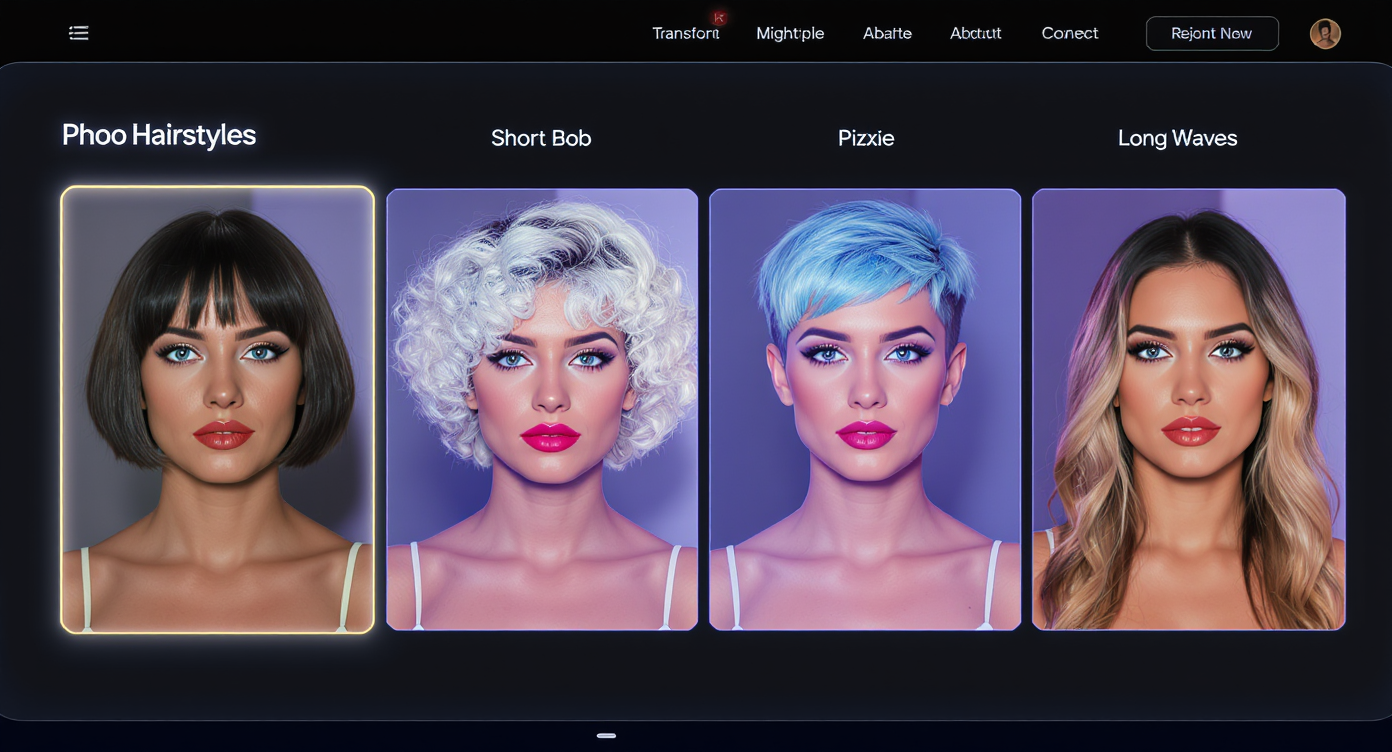
The phrase “AI hairstyle changer” might sound futuristic, but at its core, it’s beautifully simple. An AI hairstyle changer is an application powered by artificial intelligence that lets you swap hairstyles virtually. Instead of imagining how you’d look with bangs, a pixie cut, or blonde highlights, the system analyzes your face and overlays the style seamlessly onto your uploaded photo.
Unlike traditional photo-editing apps where results often looked flat or cartoonish, Flux Kontext AI ensures the transformation appears photorealistic. Every strand, shadow, and reflection is accounted for, making it look like the hairstyle truly belongs to you.
What makes this even more appealing is the personalization. You’re not just choosing from a handful of preloaded looks; you’re experimenting with a wide library of styles that adapt to your unique face shape and features. Want to test a trendy bob? Curious about how platinum blonde might change your vibe? Considering a bold afro or a sleek layered cut? The AI takes your curiosity and turns it into a convincing preview.
And this isn’t just for casual fun. Professional stylists and salons increasingly recommend tools like the AI hairstyle changer to help clients visualize potential cuts before they sit in the chair. It bridges the gap between creative imagination and practical execution.
Why Try On Hairstyles with AI?
We’ve all had the moment of doubt before a haircut: Will this style look good on me? Is it worth the risk? AI-powered tools change that hesitation into excitement by letting you try on hairstyles instantly.
There are three major reasons why this approach is so appealing:
-
Confidence Before the Cut
No more walking into a salon with only a vague idea or a Pinterest photo of someone who looks nothing like you. Instead, you arrive with proof—your own photo showing exactly how the cut or color will look on you. -
Exploration Without Limits
Ever wondered how you’d look with pastel pink hair? Or thought about shaving the sides for an edgy undercut but weren’t sure if you could pull it off? The AI lets you experiment boldly, free from the worry of regret. -
Practical Style Planning
For special occasions like weddings, interviews, or photo shoots, testing styles beforehand helps you make decisions calmly and avoid last-minute panic. A tool like the AI hair style try on filter with Flux Kontext AI makes that planning effortless.
And then there’s the pure fun factor. Many users enjoy trying on wild or fantasy-inspired hairstyles—blue curls, rainbow braids, celebrity-inspired looks—and sharing them on social media. The try on hairstyles feature doubles as entertainment and self-expression.
Walkthrough: How the Haircut Simulator Works
The magic of this tool comes to life in its interface, which is as intuitive as it is powerful. The haircut simulator is designed for anyone to use—whether you’re tech-savvy or just looking for quick fun.
Here’s how it works, step by step:
-
Upload Your Image
Start by uploading a photo of yourself. The system supports JPG, WEBP, and PNG formats. For best results, choose a picture with clear lighting and your face fully visible. -
Enter a Prompt (Optional)
In the prompt box, you can type exactly what you want: “short bob with layered bangs,” “long curls with blonde highlights,” or even something experimental like “purple pixie cut with edgy side fade.” The AI interprets your request and generates a matching style. -
Set Resolution
Want a square preview for Instagram or a higher-quality shot for reference? Adjust the resolution here. -
Select Gender (Optional)
If you want styles aligned with specific gendered fashion, you can toggle the setting. Otherwise, keep it neutral for maximum exploration. -
Choose Hair Style
The dropdown menu lets you browse preset styles like Afro, Bob, Pixie, and more. This is a quick way to jump between looks without crafting long prompts. -
Pick Hair Color
Black, blonde, brown, red—or get creative with vibrant shades. This option is perfect for anyone debating a major color change. -
Generate Your Look
With everything set, hit the “Generate” button. Within moments, Flux Kontext AI processes your request and displays your new style. The realism is impressive—hair looks naturally integrated with your head shape, lighting, and expression.
This smooth, guided process makes the haircut simulator feel less like an app and more like a personal stylist at your fingertips.
AI Hairstyle Technology Behind It
At the core of this experience lies advanced AI engineering. The AI hairstyle tool doesn’t just paste a wig-like overlay onto your image. Instead, it uses deep learning to analyze:
- Facial Geometry – The AI maps the shape of your head, forehead, jawline, and overall proportions to ensure the hairstyle aligns naturally.
- Lighting and Shadows – It adjusts the new style so that highlights and shadows blend with your photo’s original lighting, avoiding the flat “sticker” effect common in older apps.
- Texture and Detail – Whether curly, straight, or wavy, the AI maintains hair texture that looks realistic strand by strand.
- Color Adaptation – Hair color isn’t just slapped on; tones are adjusted to complement your skin tone and environment.
Flux Kontext AI brings an added layer of intelligence to this system. Its context-aware rendering means it recognizes variations in hair thickness, face angles, and even expressions. The result? You don’t just see a hairstyle—you see yourself, authentically styled.
This realism is what makes the AI hair style try on filter with Flux Kontext AI such a breakthrough. It isn’t just a gimmick; it’s a reliable styling tool that reduces uncertainty and inspires creativity.
Using a Haircut Filter for Fun and Style Planning
One of the most exciting features of modern AI styling is the haircut filter. At first glance, it looks like just a playful social media tool—but it’s far more than that.
Filters have long been popular on Instagram, TikTok, and Snapchat, but those were mostly for fun effects: bunny ears, flower crowns, or temporary color overlays. They weren’t meant to help you make real-life decisions about your look. This is where Flux Kontext AI takes things to the next level.
With its intelligent blending system, the haircut filter doesn’t just place a style “on top” of your face. It realistically integrates the new look into your photo. Imagine posting a TikTok showing yourself with a chic bob one moment and vibrant rainbow curls the next—it’s not only entertaining but also shockingly convincing.
For everyday users, this means the haircut filter doubles as both a fun toy and a practical style guide. You can share different looks with friends to get feedback before making a decision, or even run polls on social platforms to let your audience vote. Stylists, meanwhile, can use it as a quick consultation tool to show clients a range of options during an appointment.
This dual role—fun for social sharing, serious for planning—makes the haircut filter one of the most versatile features in the AI styling toolkit.
Haircut Generator: Endless Styling Possibilities
If the haircut filter is about trying styles one by one, the haircut generator is about opening the floodgates of creativity. It’s essentially a styling engine that generates limitless variations of hairstyles and colors, powered by Flux Kontext AI.
Here’s what makes the generator so powerful:
-
Infinite Variety
Instead of relying on a static library, the haircut generator can create unique hairstyles based on prompts. Want “long silver hair with fantasy braids”? Or “shoulder-length bob with neon highlights”? Type it in and let the AI generate something new. -
Fantasy and Experimentation
Many users love exploring looks they’d never dare to try in real life. Think anime-inspired spikes, mermaid waves, or celebrity red-carpet styles. The haircut generator gives you the freedom to experiment wildly without any risk. -
Professional Utility
Stylists and fashion consultants use the generator to test upcoming trends on clients. Instead of saying “this cut might suit you,” they can show exactly how it would look. This builds trust and improves client satisfaction. -
Event Preparation
Big events like weddings or professional photoshoots demand careful styling. With the haircut generator, you can preview multiple styles in advance, ensuring you pick the one that matches your outfit, theme, or desired aesthetic.
In short, the haircut generator is a tool for play, planning, and professional-grade visualization.
Case Example: From Doubt to Confidence
To understand the real impact of these tools, consider this scenario:
Emily, a 27-year-old professional, had been debating whether to chop her long hair into a short bob. She admired the look on celebrities but worried it wouldn’t suit her face shape. Instead of risking regret, she turned to the AI hair style try on filter with Flux Kontext AI.
- Step 1: She uploaded a clear selfie into the haircut simulator.
- Step 2: She entered a prompt: “short angled bob with chestnut brown color.”
- Step 3: Within seconds, the AI presented a photorealistic preview. Emily was shocked—it looked natural, as though she had already gone through with the cut.
- Step 4: Curious, she tried different variations: adding bangs, lightening the color, even testing bold highlights. Each time, the model adjusted seamlessly, keeping her facial identity consistent.
- Step 5: Emily shared the images with her friends, who voted overwhelmingly in favor of the bob.
Armed with confidence, she visited her stylist with the AI-generated preview in hand. The result? A haircut that suited her perfectly and zero post-salon regret.
This story highlights the tool’s practical value: it transforms uncertainty into excitement, giving users the reassurance they need before making a major styling decision.
Explore More Flux Kontext AI Tools
While the hairstyle tool is impressive on its own, FluxProWeb offers a broader ecosystem of AI models under the Flux Kontext family. Each model serves a unique purpose, helping users push creative boundaries in different ways:
-
Flux Pro Kontext
A professional-grade editor ideal for advanced image manipulations, giving designers maximum control over fine details. -
Flux Max Kontext
Built for ultra-detailed, high-resolution transformations, perfect for professional photography and print-ready visuals. -
Flux Kontext Dev
A developer-focused tool that enables custom integration of AI styling into apps, websites, or creative workflows. -
Flux Kontext Lora
Designed for fine-tuned, LoRA-based models that let users experiment with niche or hyper-specific styles. -
Gemini 2.5 Flash Image Generator
A multimodal powerhouse that complements the Flux Kontext tools by offering consistent, context-aware image editing for characters, scenes, and branding.
These tools extend beyond hair styling—they represent a full ecosystem of creative AI solutions. If the AI hairstyle changer is your entry point, these advanced models are the next step in unlocking professional-grade possibilities.
Conclusion
The journey from indecision to confidence is one that every person faces when considering a new hairstyle. Thanks to modern technology, that journey is now easier, faster, and more fun. The AI hair style try on filter with Flux Kontext AI combines practicality with playfulness, allowing users to experiment fearlessly and make informed choices.
- The haircut filter turns styling into a shareable, social experience. Also, it opens the door to endless creativity and professional visualization.
- Case studies show how the tool empowers real people to embrace new looks with confidence.
- And beyond hairstyling, the Flux Kontext family offers a suite of powerful AI models for creators, designers, and developers.
Whether you’re a casual user curious about a fresh cut, a stylist preparing for client consultations, or a creator exploring AI’s potential, this tool is more than just a novelty—it’s a game-changer.
So before you book your next haircut, why not take the safe, exciting route? Upload your photo, experiment with styles, and let Flux Kontext AI show you your future look today.