Seedream 5.0 AI Image Generator by Bytedance Seed AI
Generate/ Edit images with Seedream 5.0 AI Image Generator, powered by ByteDance Seed AI. Seedream 5.0 AI is the next-generation AI image model, offering upgraded object consistency, enhanced text comprehension, and more advanced image editing capabilities than ever before.
Core Features of Seedream 5.0 AI Image Model
With the integration of innovative technologies, this model has made notable advances in interactive precision and information processing capability.
Real-Time Retrieval-Assisted Generation
Seedream 5.0 is equipped with intelligent judgments to recognize time-sensitive information in prompts. For references to recently released tech, trending topics, or specific brands, the system will automatically consult up-to-date public data for generation. This ensures images remain in sync with real-world events rather than being constrained by the training set's limitations.

High-Fidelity Editing Control
This version significantly narrows the gap between textual description and visual output, understanding complex spatial relations (like lever balance or occlusion) and numeric details (like clock hand angles). Feature transfer is supported, so reference image color, makeup, or design style can be seamlessly applied to new images.
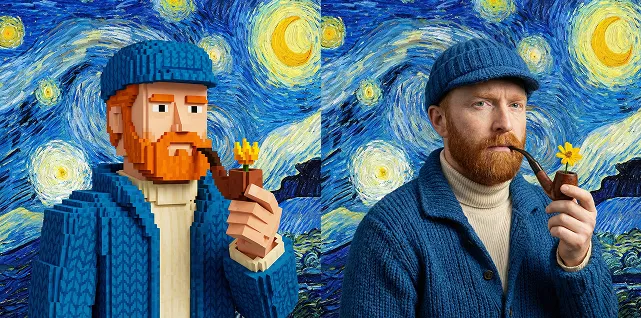
Deep Logical Reasoning
Seedream 5.0 handles tasks which require multistep reasoning, such as predicting 3D assembly from flat designs or changes in objects based on scientific principles (e.g. biological development). This logical capability ensures generated content is not just visually compelling, but also grounded in the physical world.
Dual Output Resolutions
Supports native 2K and AI upscaled 4K outputs. The 2K mode retains the original composition and efficiency, while the 4K mode enhances texture and detail for commercial-grade posters and high-res materials.

Advantages of Seedream 5.0 AI Image Generator
A blend of smart automation and streamlined workflows delivers outstanding professional value.

Knowledge and Aesthetic Advancement
The preview version prioritizes intelligence—ensuring technical accuracy for architecture drawings, scientific diagrams, anatomy, and similar demanding tasks. The official release will then add advanced visual aesthetics from prior versions, for balance of reasoning and beauty.
Intuitive Example-Based Interaction
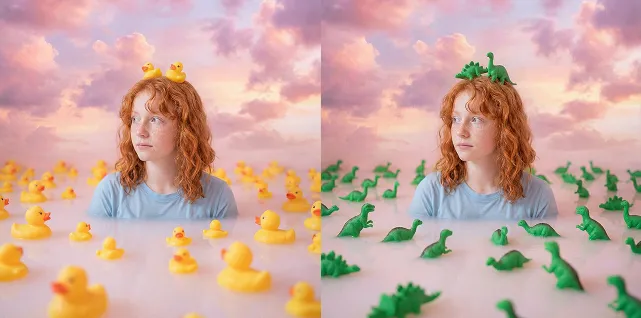
Features example-driven editing, letting users demonstrate transformations with before-and-after images. The model learns the logical change (e.g. environment, perspective, or material shifts) and applies it to new creations—no verbose text description required.
Cross-Disciplinary Professional Adaptability
Handles both data-intensive (e.g. geo-labels) and creatively expressive (cinematic lighting) tasks via flexible modes. A rich knowledge base enables it to interpret specialist terms and translate them into precise visual language.
Highly Efficient Visual Consistency
For brand and series work, Seedream 5.0 precisely identifies and extends a design language to maintain unity in color, style, and texture across all generated assets.
Creative Scenarios with Seedream 5.0 AI Image Generator
Serving the diverse needs of professional creators, the model provides broad real-world utility.
Commercial Visual Design
Quickly generate on-brand posters and promotional visuals matching precise brand style rules. Real-time search adds the newest trends or product elements, dramatically shortening idea-to-output time.
Science and Education Communication
For info-rich fields like biology diagrams, geographical maps, or physics illustrations, Seedream 5.0 generates scientifically accurate and annotated graphics, vastly improving the quality of educational visuals.
Architecture and Industrial Previews
Architects and engineers can convert technical drawings or sketches to highly realistic 3D renders, with light and materiality faithfully understood—speeding up design verification.
Social Media Creative Imaging
Time-sensitive content benefits from real-time retrieval of popular cultural elements, and local precision editing lets users style portraits or swap backgrounds for unique, competitive visuals.
More Social Sharing about Seedream 5.0 AI Image Generator
Get more sharing about Seedream 5.0 Image AI in Twitter
How to Use Seedream 5.0 AI Image Generator
Start creating in five simple steps:
Log in to the image platform and select “Seedream 5.0-Preview” in model settings
Enter your creative prompt. Include explicit current affairs, locations, or brands to activate retrieval when needed.
To edit an image, upload a reference and choose attribute(s) to transfer—such as color, style, or layout.

FAQs about Seedream 5.0 AI Image Generator
Discover More AI Tools for Next-Level Image Creation
Check out our full suite of AI-powered tools for generating and editing images, free to use.


